Showing posts with label Best Practice. Show all posts

Tuesday, March 4, 2014

The OLAP Extension is now available in SQL Developer 4.0


The OLAP Extension is now in SQL Developer 4.0.

See
http://www.oracle.com/technetwork/developer-tools/sql-developer/downloads/sqldev-releasenotes-v4-1925251.html for the details.

The OLAP functionality is mentioned toward the bottom of the web page.
You will still need AWM 12.1.0.1.0 to
  • Manage and enable cube and dimension MV's.
  • Manage data security.
  • Create and edit nested measure folders (i.e. measure folders that are children of other measure folders)
  • Create and edit Maintenance Scripts
  • Manage multilingual support for OLAP Metadata objects
  • Use the OBIEE plugin or the Data Validation plugin
What is new or improved:
  • New Calculation Expression editor for calculated measures.  This allows the user to nest different types to calculated measures easily.  For instance a user can now create a Moving Total of a Prior Period as one calculated measure.  In AWM, it would have required a user to create a Prior Period first and then create a Moving Total calculated measure which referred to the Prior Period measure.  Also the new Calculation Expression editor displays hypertext helper templates when the user selects the OLAP API syntax in the editor.
  • Support for OLAP DML command execution in the SQL Worksheet.  Simply prefix OLAP DML commands by a '~' and then select the execute button to execute them on the SQL Worksheet.  The output of the command will appear in the DBMS Output Window if it is opened, or the Script Output Window if the user has executed 'set serveroutput on' before executing the DML command.
  • Improved OLAP DML Program Editor integrated within the SQL Developer framework.
  • New diagnostic reports in the SQL Developer Report navigator.
  • Ability to create a fact view with a measure dimension (i.e. "pivot cube").  This functionality is accessible from the SQL Developer Tools-OLAP menu option.
  • Cube scripts have been renamed to Build Specifications and are now accessible within the Create/Edit Cube dialog.  The Build Specifications editor there, is similar to the calculation expression editor as far as functionality.

Thursday, March 28, 2013

Oracle SQL Developer Data Modeler 3.3 now available

http://www.oracle.com/technetwork/developer-tools/datamodeler/overview/index.html

Attention all data modellers - we are pleased to announce the release of SQL Developer Data Modeler 3.3. This release includes a new search, reports can be generated from search results, extended Excel import and export capabilities and more control and flexibility in generating your DDL. Here are a few links to get you started:


For data warehouse data modellers there are some very important new features around logical models, multi-dimensional models and physical models. For example:

  • Support for surrogate keys during engineering to relational model which can be set on each entity. 
  • More flexible transformation to relational model with mixed engineering strategies based on “engineer” flag and subtypes setting for each entity in the hierarchy
  • Export to “Oracle AW” now supports Oracle 11g OLAP
  • Support for role playing dimensions in export to Oracle AW.
  • Level descriptive attributes can be created without mapping to attribute in logical model.
  • Multidimensional model can be bound directly to relational model. 
  • Support EDITIONING option on views, and support for invisible indexes in Oracle 11g physical model.


Lots of great features that will make life a lot easier for data warehouse teams.

Monday, June 2, 2008

Best Practice Tips : SQL Access to Oracle DB Multidimensional AW Cubes (#2)

One of the most useful features introduced with Oracle Database OLAP is the ability for the powerful multidimensional calculation engine and the performance benefits of true multidimensional storage in the Analytic Workspace (AW), to be accessed and leveraged by simple SQL queries.

This single feature dramatically increases the reach and applicability of multidimensional OLAP – to a vast range of BI query and reporting tools, and SQL-based custom applications that can now benefit from the superior performance, scalability and functionality of a first class multidimensional server, but combined within the Oracle Database with all the other advantages that derive from that.


This post is the second in a series that I will use to share some general best practice tips to get the most out of this feature, so that you can deliver even better solutions to your business end-users:

Best Practice Tip #2: General AW Object Naming Conventions for dimensions, levels, hierarchies and attributes…(Oracle Database 10g and 11g)

The following advice will result in much easier to understand and use relational views over your AW. It makes the implementation much cleaner to visualise, and easier for other users to understand what they are looking at. It also saves a lot of typing for developers that are writing their own SQL queries!

The objective is to ensure that the generated column names in your views are easy to read, and also to avoid the possibility that generated column names may get truncated to fit within the limits for a column name in Oracle Database (when that happens your views get really ugly really quickly). Finally, it has the additional desirable side effect of making it easier and therefore quicker to do the mappings in AWM because the screens are less cluttered with long-winded object names!

Note: this advice follows both for Oracle Database 10g OLAP (eg views created by the AWM10g View Generator Plug-in) and for Oracle Database 11g OLAP, where views are auto-generated (eg when creating your Standard From AW via AWM11g).

Here is the idea:
  • Keep the names used for dimensions, levels, hierarchies, and attributes as short as possible, while still meaningful of course.
  • If possible (simply for readability in the resulting relational view and column names), avoid the use of the "_" char especially for dimension, hierarchy, level and attribute names.
  • If possible (also recommended if Oracle OLAP API clients such as OracleBI Spreadsheet Add-in , OracleBI Discoverer Plus OLAP and OracleBI Beans will be used on the same AW), create the AW in its own schema.

Don't be seduced into thinking it is a good idea to put "DIM" in the name of everything that is a dimension, or "ATT" into the name of all the attributes. You don't need to do this. The AW knows what objects are what, and you can very simply query the AW if you need, for example, to find out the names of all the Dimensions in an AW. (Another topic for another day is to walk thru all the Data Dictionary stuff that helps with this).

In other words: If you have a Product Dimension, it is self-evidently a dimension, so clogging up its name with "_DIM" or "_DIMENSION" is just extra wear and tear on your keyboard!


Example:


To illustrate the impact this advice can have, here are two Product Dimensions, which apart from the fact one follows best practice advice and one does not, are identical (example is from Oracle Database 11g AW) (you can click on the picture to see it full size):

First – two ways I could have created my Product Dimension:


Second – what the resulting dimension views for the Main hierarchy would look like in each case:


Third – how much harder it is to read and write the SQL to query the AW’s dimension as a result:

Which of these functionally identical examples is easier to read, easier to understand and easier to query?

I rest my case. Giving a bit of thought to the way you build your AW before you build it nearly always pays dividends later.

Saturday, May 31, 2008

Best Practice Tips : SQL Access to Oracle DB Multidimensional AW Cubes (#1)

One of the most useful features introduced with Oracle Database OLAP is the ability for the powerful multidimensional calculation engine and the performance benefits of true multidimensional storage in the Analytic Workspace (AW), to be accessed and leveraged by simple SQL queries.

This single feature dramatically increases the reach and applicability of multidimensional OLAP – to a vast range of BI query and reporting tools, and SQL-based custom applications – BI and operational – that can now benefit from the superior performance, scalability and functionality of a first class multidimensional server, but combined within the Oracle Database with all the other advantages that derive from that. Bottom line: if you have a tool or application that can (a) connect to an Oracle Database instance, and (b) fire simple SQL at that Database, then you can get benefit from the AWs in that tool or application.

This post is the first of a series that I will use to share some general best practice tips to get the most out of this feature, so that you can deliver even better solutions to your business end-users.

If any of you have tips and advice of your own that we can share, please contact us – we’ll be happy to publish your good ideas and experience with this feature of Oracle Database OLAP.

Anyway. Enough pre-amble. Let’s get on with it. Here goes:

Best Practice Tip #1: Creating your views (Oracle Database 10g and 11g)

Basically the first tip in the series boils down to two things:

1) Always build your AWs to Oracle Database OLAP ‘Standard Form’. This is what happens if you build them with AWM, OWB (10g-only at the time of this post, but support for 11g target AWs is due in OWB very soon), or the supplied AW API if you need to programmatically build and maintain your AW.
2) Use the free-ware “View Generator” plug in for AWM10g to build your 10g views, and leverage the automatically generated views in 11g, unless you have a very good reason not to.

Together, if you follow this advice you will save a lot of time on your project, and also increase your ability to support the application going forward. And it will be a lot easier for others (such as Oracle Support, or your local friendly Oracle OLAP Consultant) to help you if you have any problems.

More detail:

In Oracle Database 10g, there is nothing to stop you coding your own views using the SQL OLAP_TABLE() function. And, if you have an entirely custom built AW this is pretty much your only option. However, if you have developed your AW to Oracle’s OLAP Standard Form specification you can save yourself the time, by using a handy dandy little plug-in for AWM10g. The plug-in is free shareware for AWM10gR2 & can be downloaded from here, with the associated ReadMe here.

The plug in steps you thru a simple wizard within AWM, allowing you to choose which measures etc you need, and then creates the views for you (storing the biggest lump of syntax – the ‘limitmap’ parameter which describes which AW objects show up in what columns in your view – inside the AW itself, in a multi-line text variable/measure).

In Oracle Database 11g, while OLAP_TABLE() is still available for you to use if you like (and sometimes it is perfect for your needs as it has lots of very clever hooks by which you can trigger various OLAP actions whenever a user selects from the view), for most cases, the new CUBE_TABLE() function added in Database 11g is much easier and therefore recommended.

CUBE_TABLE() views are what AWM11g automatically creates for you when defining the objects inside the AW. Assuming you have a valid Standard Form 11g Database AW, such as you might build in AWM11g, CUBE_TABLE() is much, much easier to use than OLAP_TABLE().

For example, the entire syntax required to create a Dimension View, for a specified hierarchy of that Dimension in an AW (not that I even have to type any of this in, as the AWM tool does it automatically for me) is as follows:

CREATE OR REPLACE FORCE VIEW MYDIM_MYHIER_VIEW AS
SELECT *

FROM TABLE( CUBE_TABLE('MYSCHEMA.MYDIM;MYHIER') );

How easy is that?!

All you need to know about your AW is the name of the Hierarchy (MYHIER), Dimension (MYDIM) and schema that the AW is built in (MYSCHEMA). All the object mappings that you have to tell OLAP_TABLE about, in the limitmap parameter, are automatically done as a result of improvements in Database 11g’s Data Dictionary (which is now fully aware of the details of the contents of the AW).

Here (below) is what an example Product Dimension looks like in AWM11g, and the resulting View:
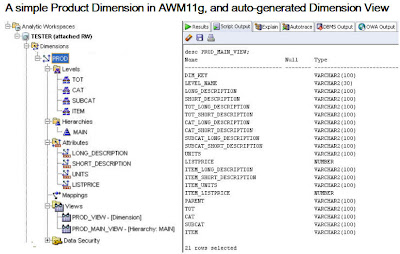


Note that the OLAP Option only allows one Dimension or Cube (and therefore Dimension View, or Cube View) of a given name in each SCHEMA. For this reason, it is our recommendation that each AW be built in its own schema if possible. This will allow you, if you ever need to, to have a PROD dimension or SALES Cube in more that one unrelated AW. This tip will be included again, in an upcoming Post on Best Practice AW Design practices, and naming conventions.