Showing posts with label OLAP 11g. Show all posts

Thursday, March 28, 2013

Oracle SQL Developer Data Modeler 3.3 now available

http://www.oracle.com/technetwork/developer-tools/datamodeler/overview/index.html

Attention all data modellers - we are pleased to announce the release of SQL Developer Data Modeler 3.3. This release includes a new search, reports can be generated from search results, extended Excel import and export capabilities and more control and flexibility in generating your DDL. Here are a few links to get you started:


For data warehouse data modellers there are some very important new features around logical models, multi-dimensional models and physical models. For example:

  • Support for surrogate keys during engineering to relational model which can be set on each entity. 
  • More flexible transformation to relational model with mixed engineering strategies based on “engineer” flag and subtypes setting for each entity in the hierarchy
  • Export to “Oracle AW” now supports Oracle 11g OLAP
  • Support for role playing dimensions in export to Oracle AW.
  • Level descriptive attributes can be created without mapping to attribute in logical model.
  • Multidimensional model can be bound directly to relational model. 
  • Support EDITIONING option on views, and support for invisible indexes in Oracle 11g physical model.


Lots of great features that will make life a lot easier for data warehouse teams.

Thursday, December 2, 2010

Simba previews Cognos8 Analysis Studio accessing Oracle Database OLAP Option cubes

Hot on the heels of support for BusinessObjects Voyager, and in addition to the native Excel 2003/2007/2010 pivot table access, Simba are previewing the same connectivity for Cognos8 Analysis Studio - the dimensionally aware UI in the Cognos BI suite.

Together with the unique SQL access to the same multidimensional data & calculations in Oracle Database OLAP cubes (meaning that *any* tool or application capable of connecting to Oracle and issuing simple SQL can leverage the power of Database OLAP - like Oracle Application Express for example), plus the existing support for Oracle's own BI tools including
together with the big functionality and performance improvements in 11g , there is now every reason to move to Oracle Database 11gR2 and to fully exploit the OLAP Option - whatever your choice of front end tool(s).

For Cognos fans: Here is the Video on YouTube:


More information, see the Simba website : http://www.simba.com/MDX-Provider-for-Oracle-OLAP.htm

Tuesday, November 16, 2010

Simba previews Oracle OLAP MDX Provider connectivity to SAP BusinessObjects Voyager

Simba technologies have released a short video to preview 'Using MDX Provider for Oracle OLAP to directly connect SAP BusinessObjects Voyager to Oracle Database OLAP Option'

This will be a great capability for users of both Oracle OLAP and BusinessObjects and will futher extend the reach of Oracle database embedded OLAP cubes.


You can get more details on the Simba website

Thursday, November 4, 2010

Microsoft Certifies Simba’s MDX Provider for Oracle OLAP as “Compatible with Windows 7”

Simba announced today that Microsoft has certified its MDX Provider for Oracle Database OLAP Option for Windows 7.


This is great news for MS Office connectivity to your Database OLAP cubes. Already supported was Excel 2010 with its cool new BI features, as well as 2007 and 2003 versions. With Windows 7 support too, even the most up-to-date PCs are in good shape to exploit the OLAP Option.

Remember - via the native Excel pivot table connectivity, other features of MS-Office can also leverage the power, performance and calculation functionality of Oracle OLAP. So for example, your Powerpoint presentation to the senior management team, or the one you use when talking to suppliers or key customers can now contain live charts onto the latest information available in the Oracle Database cubes. Instead of spending time cutting and pasting static images into your slide shows each day, week or period-end you can be focusing on the news in the data and doing a better analysis of the results.

This is the perfect complement to your use of Oracle BI Enterprise Edition (10g or 11g) onto the exact same cubes for the broader BI use-case.

In addition to Microsoft Excel, Simba is gradually certifying other MDX front ends for the OLAP Option MDX Provider - with SAP-BusinessObjects Voyager already available and others due soon.

You can learn all about it on the Simba web site : http://www.simba.com/MDX-Provider-for-Oracle-OLAP.htm

Connectivity into Oracle Database OLAP 11g is market leading: with the same cubes and calculations being accessible via MDX as well as a huge range of SQL based tools and applications, it has never been easier to deploy multidimensional analytics to the masses.

Friday, October 22, 2010

Cell level write-back via PL/SQL

A topic of conversation that regularly comes up when I talk to customers and developers about the OLAP Option is write-back to OLAP cubes. The most frustrating of these conversations usually involves someone saying 'but... the OLAP Option doesn't support write-back'. This is not the case and never has been.

Since the first OLAP Option release in 9i it has always been possible to write-back to cubes via the Java OLAP API and OLAP DML. But in recent releases, a new PL/SQL package based API has been developed. My thanks go to the ever-excellent David Greenfield of the Oracle OLAP product development group for bringing this to my attention.

At the most simple level, it is possible to write to a qualified cell:

dbms_cube.build(
'PRICE_COST_CUBE USING (
SET PRICE_COST_CUBE.PRICE["TIME" = ''24'', PRODUCT = ''26''] = 711.61, SOLVE)')

In the example above, a cube solve is executed after the cell write. The objects are referenced by their logical (ie. AWM) names.

This approach is very flexible. For example you can qualify only some dimensions, in this case the assignment is for all products:

dbms_cube.build(
'PRICE_COST_CUBE USING (
SET PRICE_COST_CUBE.PRICE["TIME" = ''24''] = 711.61, SOLVE)')

You can also skip the aggregation:

dbms_cube.build(
'PRICE_COST_CUBE USING (
SET PRICE_COST_CUBE.PRICE["TIME" = ''24'', PRODUCT = ''26''] = 711.61)')

or run multiple cell updates in one call:

dbms_cube.build(
'PRICE_COST_CUBE USING (
SET PRICE_COST_CUBE.PRICE["TIME" = ''24'', PRODUCT = ''26''] = 711.61,
SET PRICE_COST_CUBE.PRICE["TIME" = ''27'', PRODUCT = ''27''] = 86.82,
SOLVE)');

You can also copy from one measure to another.

dbms_cube.build('UNITS_CUBE USING (SET LOCAL_CUBE.UNITS = UNITS_CUBE.UNITS'));

This will copy everything from the UNITS measure in UNITS_CUBE to the UNITS measure in the LOCAL_CUBE. You can put fairly arbitrary expressions on the right hand side and the code will attempt to loop the appropriate composite. You can also control status.


For more details, take a look at the PL/SQL reference documentation

Tuesday, July 20, 2010

A first look at OBIEE 11g with Oracle OLAP

For those who missed it, the global launch for the 11g release of the Oracle Business Intelligence Enterprise Edition suite (OBIEE) took place in London on July 7th.

And the fantastic news for Oracle OLAP customers is that OBIEE 11g will work out-of-the-box with Oracle OLAP in almost exactly the same way as OBIEE 10g does - with just one additional configuration step required to enable the new OLAP-style front-end functionality.

Of course, there are other features that are relevant such as the WebLogic application server, and the new security model, but these have already been well blogged elsewhere so the focus of this posting will be Oracle OLAP integration.

To illustrate how easy it is, I will use a trusted old friend as a starting point - the 11g Global sample schema. I have installed this in an Oracle 11.2 database instance, created an Oracle OLAP Analytic Workspace, and then refreshed this AW so that the dimensions and cubes are built.

With an AW in place, the next step is to use the OBIEE plug-in for AWM to generate the metadata required for the OBIEE Server. For those who have not used the plug-in before, check out this excellent demonstration of how it works. While this particular version of the plug-in was originally released to work with OBIEE 10g, and presumably an updated version will be released in due course, it can be used in exactly the same way in OBIEE 11g to import metadata into the Administration tool.


And at first glance, aside from a few updated icons, this version of the Administration tool looks very similar, but the biggest change related to the administration of OLAP data sources (relational or MOLAP) is the ability to map hierarchy objects right through into the presentation layer.

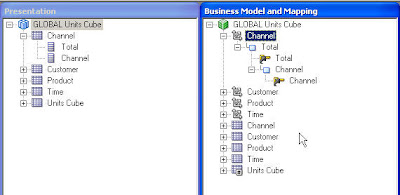
Here is the Metadata generated by the plug-in for the Channel Dimension in both the Business Model and Presentation layers

The new 11g OLAP-style front-end functionality is enabled by adding these hierarchies into the Presentation layer too. This can be achieved by a simple click-and-drag for each hierarchy like the following which is again for the Channel Dimension
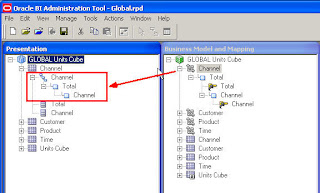


Hopefully, the next release of the plug-in will handle this additional step automatically (and also provide support for value-based hierarchies which were not supported by the front-end in OBIEE 10g) but in the meantime it really is just a simple click-and-drag for each dimension.

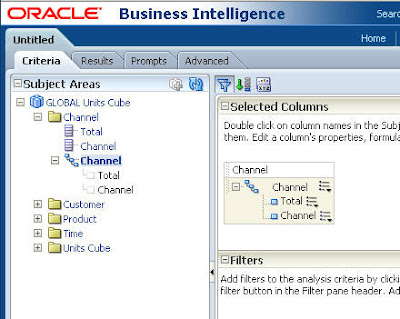
Once all the hierarchies are mapped through into the Presentation Layer, the cube is ready to query. I can log into the OBIEE 11g home page and create a new analysis based upon my Oracle OLAP subject area. The new hierarchies are available for selection when I construct a query


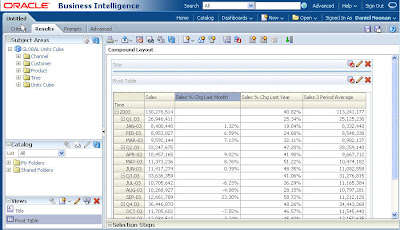
I can then select all of the 'columns' I need for my query and view the results as a pivot table. Here is a really simple example showing Sales by Time. I have also added some calculated measures which have been created inside the AW and derive really useful analytics from the Sales measure. This is a classic reason for using the OLAP Option in the first place - it facilitates the easy creation of calculations that are difficult (or often impossible) to express in SQL. And by having them embedded in the cube, the only thing that the SQL tool (in this case OBIEE) needs to do is select the calculation as a field in a view. How easy is that?!


Once a pivot table with Hierarchy-based columns has been created, this is where the new front-end features really come into play. Some highlights include Calculated Items (derived Dimension members) and a new Selector (which allows dimension selections to be built up as a series of steps based upon add/keep/remove logic):
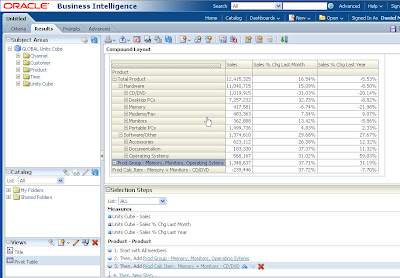


For those familiar with Discoverer OLAP, or Sales Analyzer, Financial Analyzer and Express Objects/Analyzer, these aren't exactly revolutionary features, but combined with all the other great features of the OBIEE suite, this is now a very compelling platform for your Oracle OLAP data.

Finally, I would guess that there are probably thousands of old Oracle Express/OLAP systems that have been waiting for a BI platform like this. If you work on one, what are you waiting for?

***OBIEE 11g can now be downloaded from OTN***

Monday, February 16, 2009

New! Oracle OLAP Overview Video


A new fifteen minute Oracle OLAP video has been released - describing the benefits of Oracle OLAP in the context of the Oracle Database, Data Warehouse and Business Intelligence platform.

You can either watch this video online, or download for replay on an iPod:
• Click here to view the video now
• Click here to download the iPod video

Friday, February 6, 2009

New Tutorial - Creating Interactive APEX Reports Over OLAP 11g Cubes

The latest in a recent series of 11g OLAP tutorials has been added to the Oracle OLAP product page on OTN.

The tutorial is called 'Creating Interactive APEX Reports Over OLAP 11g Cubes' and shows how you use Oracle Application Express (APEX) to create an interactive sales analysis report that runs against OLAP 11g data.


You learn how to query and create analytic reports of OLAP 11g cubes, including both stored and calculated measures. You also learn how to apply query techniques that leverage unique characteristics of OLAP 11g cubes.

The other tutorials already published in this series are:

Thursday, February 5, 2009

Oracle OLAP Newsletter - February 2009

The latest Oracle OLAP newsletter, February 2009, has been posted onto OTN and is available by clicking here

The customer feature this time is R.L. Polk who have used 11g OLAP to simplify their delivery of aggregate data through the use of cube organised materialised views. This is a fantastic case study which captures the true value of this functionality (note the dramatic improvements in both build and query times), and of having Oracle OLAP embedded in the Oracle Database.

The highlights of the Product Update section this time are the release of the latest version of AWM 11g (11.1.0.7B), and also a new version of the BI Spreadsheet Add-in (10.1.2.3.0.1 - enough digits?!) which now includes support for Excel 2007.

Monday, January 26, 2009

Gartner identifies Oracle OLAP as a key strength in Oracle's DW proposition

You may have already seen elsewhere that Gartner recently published an updated magic quadrant for Data Warehouse Database Management Systems.

It was a little bit surprising to see that the HP Oracle Exadata Storage Server and the HP Oracle Database Machine hadn't provided a bigger boost to Oracle's rating (although, as you would expect, Oracle is still firmly entrenched in the leaders quadrant). Perhaps it is still a little early for their significance to be fully appreciated. There is likely to be a more pronounced improvement in Oracle's rating the next time this magic quadrant is published.

Of particular interest to this blog is the fact that Oracle OLAP is identified as a key strength of Oracle's Data Warehousing proposition. The research highlights the enhanced materialized view and cube management features added in 11g, along with transparent SQL access and incremental update.

It is really great to hear such a significant endorsement of Oracle's strategy to embed the Oracle OLAP engine inside the Oracle Database.

If you want to read more about what 11g OLAP could do for your Oracle Data Warehouse, then check out this white paper

Wednesday, January 7, 2009

Get hands-on with 11g OLAP & Oracle Business Intelligence Enterprise Edition

Happy New Year to everyone!!

Following the announcement last month of two new 'Oracle By Example' tutorials on building and querying 11g OLAP cubes, here are the details of a further two tutorials on working with 11g OLAP and Oracle Business Intelligence Enterprise Edition (OBIEE).

The first tutorial shows how to create OBIEE metadata over 11g OLAP cubes

(if you are using 10g OLAP, use this tutorial to create OBIEE metadata instead)

The second new tutorial shows how to query 11g OLAP cubes using OBIEE Answers - using the metadata repository created during the first tutorial

While OBIEE Answers is a widely used query tool for Oracle OLAP (for an example, see the article on Micros Systems), it would be interesting to hear from people using some of the other components of OBIEE, especially some of the newly integrated 'plus' components like Smart View which appears to be receiving a lot of development effort from the BI/EPM folks.

Please feel free to share any experiences you might have in our comments section.

Monday, December 29, 2008

Now Available! Two new Oracle OLAP Demonstrations

Two new Oracle OLAP demonstrations have been added to the Oracle OLAP product page on OTN:

Fast Answers to Tough Questions Using Simple SQL :- Oracle OLAP is a world class analytic engine embedded in the Oracle Database. OLAP Cubes and dimensions are easily accessible thru a star-model. Using very simple SQL, Oracle OLAP delivers fast answers to tough, analytic questions. This demonstration shows how to query OLAP cubes using several tools, including: Oracle Business Intelligence Enterprise Edition, Application Express and SQL Developer.

Transparently Improving Query Performance with Oracle OLAP Cube MVs :- Oracle OLAP cubes may also be deployed as materialized views. Summary queries written to base fact tables can transparently leverage the fast query performance delivered by Oracle OLAP - without any changes to the application's query. The Oracle Optimizer automatically rewrites queries to cubes when appropriate. This demonstration shows how Oracle Business Intelligence Enterprise Edition seamlessly benefits from this capability. The demonstration then provides an "under the covers" view of how this improvement is achieved.

Sunday, December 21, 2008

Get hands-on with 11g OLAP

You may have already noticed but over the past couple of weeks some new 11g OLAP training material has been published on the OTN OLAP home page.

Two new tutorials have been added to the popular Oracle By Example (OBE) series.

The first is titled 'Building OLAP 11g Cubes' and covers using Analytic Workspace Manager (AWM) 11g to build and load an OLAP cube.

The second is titled 'Querying OLAP 11g Cubes' and is a guide to querying a cube via SQL, both directly using OLAP Cube Views, and indirectly using Cube Materialized Views.

Supporting both of the tutorials is a new sample schema which gives you the opportunity to get hands-on and experiment in your own environment. Remember, that patch level 11.1.0.7 is required and to always check the recommended release details for your chosen operating system.

Tuesday, December 16, 2008

New 11g OLAP Cube Materialized Views tutorial posted onto OTN

Another new tutorial has been added to the Oracle OLAP home page on OTN.

This tutorial is titled 'Oracle OLAP 11g: Setting Up Cube Materialized Views for Query Rewrite'

The tutorial describes how to enable cubes as Cube Materialized Views, and how to enable and troubleshoot Query Rewrite using Analytic Workspace Manager 11.1.0.7. It is intended as a quickstart for intermediate developers.

Monday, December 8, 2008

Oracle Database 11g: OLAP Essentials - First dates announced

Following the announcement last week about the new Oracle OLAP 11g Oracle University Training Course, the dates and locations for the first classes have been announced.

The very first class will be in Bridgewater, New Jersey, US from 20-Jan-2009 through to 22-Jan-2009.

The first class in Europe will be in Reading, UK from 21-Jan-2009 through to 23-Jan-2009.

The code for the course is D70039GC10 and more details on both events can be found on the Oracle University web site

Be sure to register early if you wish to attend as places are sure to be high in demand.

Thursday, December 4, 2008

New! Oracle OLAP 11g Oracle University Training Course

A brand new OLAP 11g training class has been added to the Oracle University schedule.

Here is a brief synopsis:

Oracle OLAP 11g, a fully-integrated component of Oracle Database 11g, provides a full featured multidimensional data model and calculation engine that is easily accessible to any SQL based business intelligence application or tool.

In this course, students learn to progressively build an OLAP data model to support a wide range of business intelligence requirements. Students learn to design OLAP cubes to serve as a summary management resource for existing SQL table queries. Students also learn to leverage the power of Oracle OLAP by adding rich analytic content to your data model.

Students learn to create sophisticated reports of OLAP data by using simple SQL queries. Students also create and execute OLAP queries in SQL Developer, Oracle Application Express (APEX), and in Oracle BI Enterprise Edition. Students learn to implement cube security, including how to authorize access to cube data and methods for scoping user views of data. Finally, students learn to design OLAP cubes for performance and scalability.

Learn To:

* Design and create an Oracle OLAP data model
* Enable query rewrite to OLAP Cube MVs for relational summary management
* Easily create OLAP calculations that enrich the analytic content of your data model
* Query OLAP data using simple SQL
* Implement cube security
* Efficiently design cubes for performance and scalability

More details and scheduling information can be found on the Oracle University Website

Tuesday, November 25, 2008

New 11g OLAP tutorial posted onto OTN

A new tutorial has been added to OTN.

The tutorial is aimed at newcomers to Oracle OLAP and is a guide to creating and populating an 11g OLAP cube.

This is perfect for people who are looking for a gentle introduction to using the Analytic Workspace Manager OLAP administration tool and understand the basic steps in building an 11g OLAP cube.

Tuesday, October 21, 2008

New article on 11g OLAP Cube-Organised Materialized Views published onto OTN

Oracle ACE Director Arup Nanda has published a series of articles onto OTN covering important new features in Oracle Database 11g titled 'Oracle Database 11g: Top Features for DBAs and Developers'.

The series includes a feature on 'Data Warehousing and OLAP' which looks at how Cube-Organized Materialized Views can be implemented alongside other features to deliver a compelling platform for data warehousing.

With Oracle's data warehousing proposition featured heavily in the news at the moment following the recent announcement at Oracle Open World on the availability of the Exadata Storage Server and Database Machine, this is an excellently timed reminder that Oracle OLAP is a core part of this data warehousing proposition.

Friday, October 10, 2008

New Oracle OLAP White Paper released to OTN

A new Oracle OLAP white paper has been released to OTN titled "Using Oracle Business Intelligence Enterprise Edition with the OLAP Option to Oracle Database 11g"

This contains a guide on how to configure the OBIEE metadata layer to leverage the 11g Oracle OLAP option, both indirectly via OLAP cube based materialized views, and directly via OLAP cube views. For those working with 10g OLAP (cube views only), the best guide to configuring OBIEE is found in the online tutorial on OTN.

Personally, I think that it is great that this white paper captures an explanation of how to write SQL that is optimised for Oracle OLAP cube views. This is something I find customers initially struggle with - they write what they believe is a simple query and then cannot understand why the performance is not good.

This is because there are a few golden rules to writing optimal SQL for OLAP cube views and while they are simple to understand, they are not obvious to those who are new to the technology. I hope to write a more detailed Blog entry on this subject very soon, but for the time being take a look at the white paper (particularly pages 10 & 11) to see what I mean.

More 11.1.0.7 ports now available

The Oracle Database 11g Release 11.1.0.7.0 Server Patch has now been released for several other ports, including Windows 32-bit.

The full list of operating systems currently supported is:
  • Linux x86
  • Linux x86-64
  • Solaris (SPARC) (64-bit)
  • IBM AIX (64-bit)
  • HP-UX Itanium
  • Microsoft Windows (32-bit)
I would recommend that all 11g OLAP users apply the 11.1.0.7 patch as soon as it is available for their operating system.

I would also recommend that all 11g OLAP users upgrade their AWM client to the 11.1.0.7A release which can be downloaded from Metalink or OTN

As always, the best source of information for recommended releases and patches is the Oracle OLAP certification page on OTN

I'm now going to download the Windows 32-bit patch (all 1.5GB of it!), and give it a roadtest....